
Following up on the article Suspicious high CPU usage in IntelliJ?, I’m adding a new issue here that might affect you: the IDE’s “Image Animator” can put an unwanted load on the processor when attempting to display a certain type of screenshot in the plugin browser, and this continues until you close the IDE.
When does this happen:
Go to the plugin browser via the cog icon, or via File | Settings | Plugins, click on the Marketplace tab, then select a plugin that has some screenshot, like “JetBrains AI Assistant” (not all plugins are necessarily involved; it really depends on the images, and not on the plugins themselves):
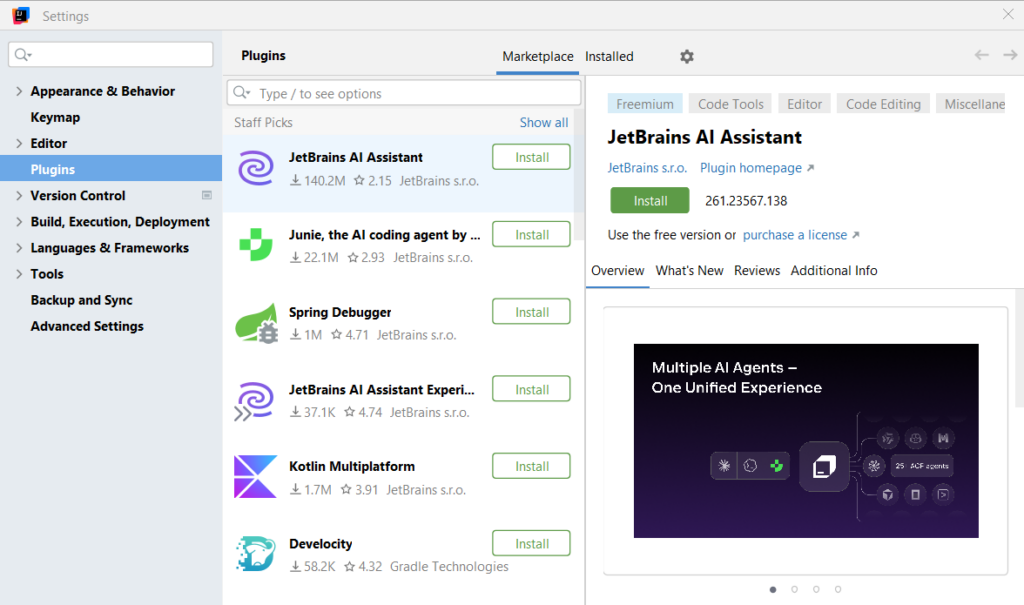
Now, you may notice higher and fluctuating CPU usage (between 10% and 40% in my case, as verified on three computers), even when the IDE is idle. And it never stops.
How to check of you’re affected:
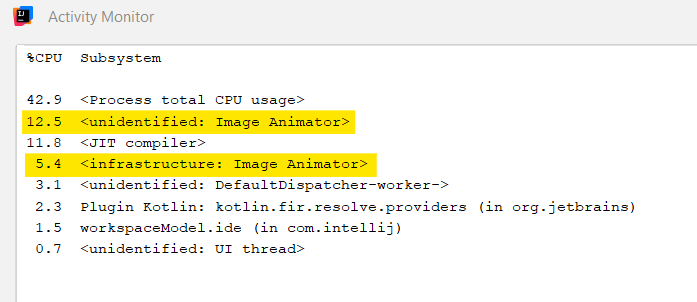
Go to Help | Diagnostic Tools | Activity Monitor, you may notice that two processes are using up some of the CPU resources and never stop: unidentified: Image Animator and infrastructure: Image Animator.
What do to?
- Unfortunately, there is currently no known workaround. You will need to restart your IDE.
- If you’re affected by this issue, up-voting IJPL-243919 would greatly help.