
Some useful IDE’s parameters can be activated via the idea.properties file. To proceed, go to Help > Edit Custom Properties, add the key + values that fit your needs, then restart your IDE.
Android: AGP support
gradle.ide.support.future.agp.versions=true
Support opening projects that use future AGPs. This opens the possibility for Android Studio and IntelliJ + the Android plugin to open versions of AGP released after it was, if that version of AGP declares that it is compatible. Source.
Bug workaround
ide.ui.new.file.chooser=true
Use it if you are affected by IJPL-74471UI – freezes on IDE due to loading a lot of unexpected files (e.g. pipe file) into VFS.
I was personally affected by this issue when working on large projects, and this is why I’m mentioning it here.
Editor adjustments
idea.max.intellisense.filesize=10000
Set the maximum file size (kilobytes) IDE should provide code assistance for. Configure it if you need the code assistance when working on large files.
idea.max.content.load.filesize=60000
Se the maximum file size (kilobytes) IDE is able to open. Configure it if you need to open large files (with or without code assistance, it depends on the previous key).
For these two keys, do not set values that are too high, otherwise it could slow down your IDE or cause Out of Memory errors. I think you understand why.
Project view tweak
project.tree.structure.show.url=false
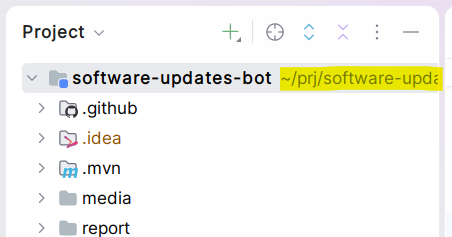
By default, the Project view shows the project name and the project path on the same line:
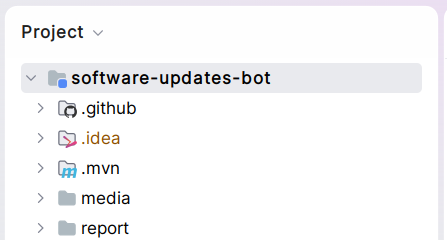
When the configuration key is set to false, the project path is gone:
No more splash screen
nosplash=true
Use it to hide the IDE’s splash screen. The splash screen can be annoying as it grabs focus during a few seconds.
Less telemetry, please
idea.diagnostic.opentelemetry.metrics.file=
idea.diagnostic.opentelemetry.meters.file.json=
Even when turning off the Data Sharing, your IDE may generate a lot of (local) OpenTelemetry logs. You can deactivate these logs by setting these two keys (with no values).